
In preparation for LSU Football postseason, the Ticket Office will begin accepting ticket requests from LSU students on Tuesday, November 12. The deadline to request SEC Championship tickets will be Wednesday, Nov. 20, at 5 p.m. The deadline to request bowl game tickets will be Wednesday, Nov. 27, at 5 p.m.
To place your request, or to create and/or join a seating group, please login to your Student Ticket Account.
GROUP SEATING PROCESS FOR 2019
The LSU Ticket Office has implemented a Group Seating Process for those students who would like to be seated next to each other for the bowl game. If you would like to sit with other students, please be sure to create and/or join a group BEFORE you place your ticket order, as this will be your only chance to do so. Group creation can begin now, while ticket requests will begin once the bowl has been announced.
Please review the step-by-step group seating instructions below.
1. Select a group leader and have them create a group.
Choose a person to act as group leader. The leader will need to login to their student account and click on “Student Ticket Requests” then click on “Create a Group.” The leader will then enter the group’s name, password, and the email address of the students that will be invited to join the group, and then click submit. An email will be automatically sent to the listed students inviting them to join the group.
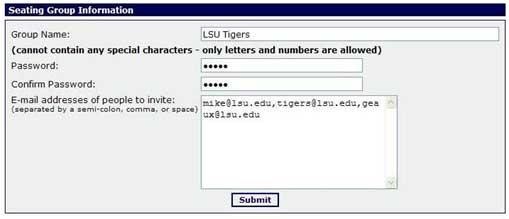
2. Invite other students to join the group.
Students whose emails were listed in the initial group creation process will automatically receive an email inviting them to join the group, but receiving the email is not a requirement to join the group. Anyone with the correct group name and matching password can join the group, so feel free to invite other students through any means you choose.
3. Join a group.
To join a group, students must login to their student account and click on the “Join a Group” button. Students will then enter the appropriate group name and password, and then click on submit.
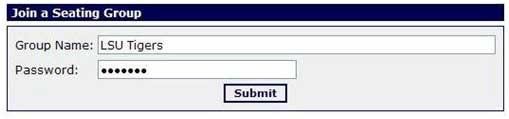
4. Request tickets and select a group.
Creating and/or joining a group does not constitute placing a ticket request. Students must still login to their student account and go through the ticket ordering process to place a request. To do so, click on “Student Ticket Requests” then “Student Bowl Requests”, then select the bowl game and enter the quantity 1. Next select your Seat Group from the drop down menu (or “None” if you choose not to sit with a group), and click “Add to Cart.”
***IF YOU DO NOT SELECT A GROUP FROM THE DROP DOWN MENU DURING THIS STEP IN THE PROCESS, YOU WILL NOT BE REGISTERED TO SIT WITH THAT GROUP, EVEN IF YOU HAVE PREVIOUSLY JOINED THE GROUP IN STEP 3.***
5. Submit payment information and process the request.
Once students have added their order to the online shopping cart, they must continue through the online ordering process until they have submitted their payment and receive a confirmation screen.
Once your order has been successfully submitted, you will receive an email confirming your request. The deadline to place an order for the SEC Championship is 5 p.m on Wednesday, Nov. 20. The deadline for bowl games is Wednesday, Nov. 27 at 5 p.m.